
Quiet PC USA - Home Buy Quiet Hardware Online My Quiet PC USA Account Quiet PC Hardware Resellers & OEM Quiet PC Forums (Worldwide) Quiet PC Frequently Asked Questions Quiet PC Worldwide Contact Quiet PC USA  Quiet PC USA accepts major credit cards including VISA, MasterCard, AMEX and Discovery.
View Your Cart
Quiet Hardware
Store Pages
Quiet PC USA is the North American Exclusive Distributor for the following PC hardware manufacturers. Image shows US and CAN flags.

Quiet PC USA is the Exclusive North American distributor for Acousti Products, QTechnology, and NesteQ quiet PC hardware.

Acousti Products. Click to see quiet products and components from Acousti Products. Q Technology. Click to see quiet hardware products from QTechnology. Nesteq. Click to see quiet PC products from Nesteq.
Quiet PC USA is a North American Authorized Reseller for the following PC component manufacturers. Image shows US and CAN flags.

Quiet PC USA is an Authorized Dealer for Gigabyte, Coolink, Grow Up Japan, Moneual, Noctua, Thermalright, Scythe and Zalman quiet PC cases and components.

Gigabyte. Click to see quiet PC hardware from Gigabyte. Enermax. Click to see quiet PSUs and other PC hardware from Enermax. Coolink. Click to see quiet PC products from Coolink. Growup Japan. Click to see quiet PC products from Grow Up Japan. Moneual. Click to see quiet HTPC products from Moneual. Noctua - designed in Austria. Click to see quiet hardware products from Noctua. Thermalright. Click to see quiet hardware products from Thermalright. Scythe. Click to see quiet computer hardware and quiet components from Scythe. Zalman. Click to see quiet products and components from Zalman. Fansis. Click to see quiet products from Fansis.

How to Silence a Computer

By Michael Farnsworth

(Please note: This is more or less the article that appeared in the October issue of the prestigious and informative EQ Magazine. The article as it appeared in the magazine has some photos of some of the components mentioned in this article. Many thanks to Craig Anderton and the wonderful staff there. If you are into audio recording and production, this magazine is an excellent and invaluable resource.)

Introduction

CPUs, hard drives, power supplies, video cards, RAM they all generate heat, so your computer needs cooling. Some PC cases have up to five or more cooling fans, which create a lot of noise. Drastic options for reducing noise include placing your computer in a machine room and using mouse/keyboard/monitor extender cables, or buying a special rack enclosure designed to house, quiet, and cool PCs. However, you can often reduce noise levels sufficiently with a thorough analysis and treatment of computer itself. To turn your roaring beastie into a silent computer requires minimizing heat build-up, choosing the quietest cooling methods possible, then using appropriate acoustical treatment. Although I've recommended a few specific products, there are so many options (with new ones arriving all the time) its impossible to cover all of them. Therefore, this article describes noise reduction basics so you can make informed decisions on the best approach for treating your PC. See the links at the end on where to find more information on products and silencing techniques.

[Top]

Power Supplies and Fans

A poorly designed power supply is usually the major noise generator in a PC. Inexpensive (cheap!) fans may have poorly designed blades that cause the air to oscillate at audible frequencies as its pulled through the fan housing, as well as inexpensive, noisy bearings. Better fans have improved silent bearings or noiseless sleeve bearings designed to rotate at high RPM with little friction, and a more efficient blade design. Unfortunately, with power supplies its hard for sleeve-bearing fans to move enough air, so ball bearing-based units are usually preferred. A bonus of ball bearing fans is that they often get noisier just before failing, whereas sleeve-bearing fans can seize up without your knowing it potentially leading to failure of the whole power supply. Audible oscillation of air can be generated as the fan pulls air past internal components, adding even more noise. Poorly-designed chassis holes in the power supply case often cause an audible siren effect as air is forced through the openings. Unlike older single-speed power supply fans, some of the better power supplies now available include temperature-sensing circuits and variable speed control so the fan rotates only as quickly as needed for proper cooling. This is good for audio applications, but make sure you check out any power supply under full load; a unit that's quiet when idling can get very noisy when the fans higher speeds kick in. There are now off-the-shelf power supplies that produce in excess of 350W yet are virtually inaudible. Installing a quiet fan in the power supply can be a worthwhile upgrade, but the procedure requires a qualified technician. Power supply capacitors can retain a lethal shock, even when unplugged. Also, the fan connector may be non-standard or may require a direct solder connection to the board.

Image shows the NesteQ PSU.

Special semi-fanless power supplies are now available such as this impressive 620 watt model made by Nesteq. How about '0' dbA!

Image shows the Zalman ZM 500W power supply unit (PSU).

This Ultra Quiet 500W Heatpipe-cooled power supply unit made by Zalman is super quiet using a thermally controlled fan and is 81%+ efficient for cooler running.

There are some relatively new models of fanless power supplies now available which are very well designed and very efficient, but remember that the main source of venting for most internal case heat build-up is usually the power supply fan so you may have to install an extra case fan anyway to exhaust the internal case heat. Also, a fanless power supply may not need a fan because it doesn't produce a very high output, so you may not be able to expand your computer without pushing it over the edge. There are more elaborate silencing methods, such as water or oil cooling, but these options are generally impractical in the typical sound production/playback environment. Nesteq offers what is perhaps the best of both worlds in their ASM line of power supplies.  These have the option of manual or thermal fan speed control, with a further option of switching the fan off for a completely fanless operation.  When selecting a power supply, look for sheathed cables that supply 5V and 12V power on the ATX connector (as well as the serial ATA connectors if so equipped) to the PCs various components. These improve airflow and don't have gaps that can generate noise as air goes through them.

Some power supplies have the exhaust fan mounted on the power supply's bottom. This helps keep fan noise inside the case rather than directly out of the back where there's a more direct path to your ear. However, as the area at the top of the inside of the case behind the power supply gets less air flow, try to mount hard drives toward the bottom of the case to avoid inadvertently creating heat pockets.

[Top]

CPU Coolers

Older CPU coolers used heat sinks with a relatively small surface area, coupled with a fixed RPM high-speed fan to move air over the small surface area. Newer CPU cooling systems may use copper instead of aluminum for better heat transfer, employ heatpipe technology, and elaborate heat sink designs that dissipate more heat into the air. If you couple these with a large fan, the fan can rotate more slowly, further reducing noise levels even further. Some heat sink/fan designs, as used in some products pioneered by Zalman, don't couple the two components directly; the fan used in this example may be much larger than traditional designs, and suspended over the CPU heat sink by a special frame that connects to the PC chassis. This reduces noise dramatically due to using a larger fan, and minimizing noise-causing air flow effects. There are also some new models of CPU coolers from that have special sealed internal channels which contain chemical gases that cool more efficiently that traditional pure solid elements such as aluminum or even copper.

Image shows two Zalman CPU coolers.

Innovative Zalman Quiet CPU Coolers with heatpipe technology are very efficient and quiet.

Some newer CPU's themselves have an improved physical architecture incorporating a narrower internal buss width and generate far less heat as a result. VIA even has a fanless CPU, but the math processing capabilities which are crucial for audio are less powerful than the better-known CPUs. (Its fine for general office duty, however.) CPU fan upgrade kits usually include thermal grease, a paste that maximizes thermal conductivity between the heat sink and the CPU. But its worth spending a little more for something like Arctic Silver 5, which has a special formulation incorporating a high-density filling of micronized silver and thermally conductive ceramic particles.

[Top]

Hard Drives

One of the most painful experiences I ever had in an audio career that spans 20+ years was editing on my first digital audio workstation, which had a Seagate Barracuda II SCSI hard drive. The whine was almost intolerable. Seagate figured out this was a problem, and their newer Barracuda drives are almost silent right out of the box, largely due to a new fluid-bearing design. These drives are now common in audio workstations. If you have a noisy drive, you can mount it in a special audio baffle unit that fits in a spare 5-1/4 drive bay such as the original 'SilentDrive' which is fine for drives dissipating heat levels up to 6.8 watts or for hotter-running drives you can use an enclosure like the SmartDrive 2002C Copper-lined Aluminum Hard Drive Enclosure which can even handle the heat from 15,000 RPM drives, or build a baffle around the area where the drive is mounted with special sheets of acoustic materials designed for this purpose.

Image shows the original 'silent drive'.

This is the original SilentDrive. It's made of special thermal plastic with two aluminum plates to transfer heat outside the enclosure.

Image shows the smart drive 2002C.

This is the SmartDrive 2002C Aluminum Hard Drive Enclosure. The SmartDrive 2002C is copper-lined and decreases noise level up to 30%, down to 30dB.

Note that heat builds up quickly in an enclosed space. Using an enclosure used to only work for 5,400 RPM drives, and most (but not all) 7,200 RPM drives without overheating them until the newer enclosures became available. Inexpensive, stick-on thermal monitors can indicate the drive temperature, which you can check against the manufacturers temperature ratings to make sure you're not cooking the drive. 10,000+ RPM drives are much more difficult to silence but it can be done. Be realistic about what kind of track counts you need; a slower drive might create a more pleasant working environment.

[Top]

Case Fans

Case fans, CPU fans, motherboard, and video card cooling fans share the same design considerations described under Power Supplies, and you pretty much get what you pay for. You can also decrease case fan noise with vibration isolation. Even rubber grommets placed over the mounting bolts, between the fan frame and the surface to which the fan mounts, will help reduce the transfer of vibrations to areas of the case that can resonate sympathetically and acoustically amplify the noise. You could also cut your own gaskets out of sound dampening materials and place them between the fan and mounting area. Recently, Acousti Products has introduced some fairly inexpensive, yet effective, silicone gel fan mounting grommets and similar fan gaskets. Acoustic absorbing materials (available from companies that sell components for quieting PCs) can be placed around the airflow path inside the case to absorb noise. Just be careful not to impede the airflow itself. Standard 80mm case fans usually come in one or two wiring configurations, and each has its own type of connector. A four-pin Molex connector (like the type that supplies power to a hard disk drive) delivers 12V DC. It doesn't inherently accommodate speed control. The three-wire type of fan allows feedback from the fan so the user can see the fan speed, and/or an alarm can sound if the fan fails. If your three-pin fan speed isn't controlled by the motherboard, inexpensive fan speed controls let you limit the fan speed to a lower RPM. This can drop unwanted noise levels quite a bit, but make sure there's still enough airflow to dissipate heat.

Image shows an AcoustiFan, one ofthe quietest fans around.

AcoustiFans from Acousti Products come in various sizes including 60mm, 70mm, 80mm, 92mm and 120mm.  Pictured is the 120mm AcoustiFan DUSTPROOF premium quiet PC fan.

[Top]

Fan Specifications

A fans spec sheet will specify air throughput in CFM, or cubic-feet-per-minute. As a general rule, bigger is better; a 120mm fan rotating at a low speed with usually move more air than a smaller fan running at a higher RPM. I've had the best results so far with the AcoustiFan 120mm fans from Acousti Products, which are literally inaudible. CASES Many people feel that aluminum cases are better at dissipating internal heat buildup than steel; however, a thick steel case reduces mechanical transmission and sympathetic resonance, while providing a barrier mass to stop internal sound from getting out of the case. Well-fitted case parts can help reduce noise that escapes through cracks (e.g., where the side panels meet the front bezel). Some people leave the side of their PC off, thinking it provides more ventilation. However, many cases need to be fully assembled for the air flow design to work effectively. When evaluating PC cases, consider getting a full-sized tower instead of a smaller tower even if you don't need the extra space. A larger internal space means that less air needs to go through the system per minute. Always think efficient air flow and convection is good when installing internal components. If you can leave some air space between multiple hard drives, do so.

[Top]

Acoustic Treatment

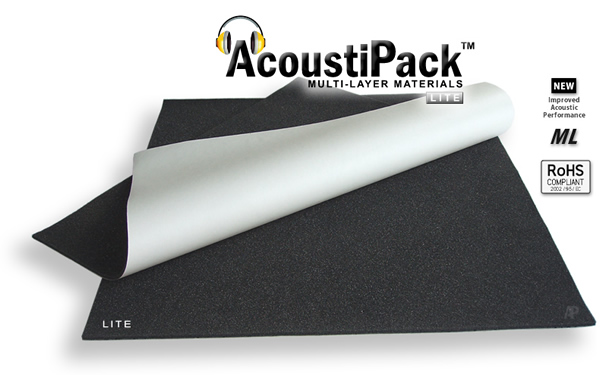
There are several user-installable sound dampening/absorbing aftermarket kits. These are usually a better buy than purchasing a case with the materials pre-installed, because you can customize the installation to your specific hardware. The best kits contain at least one type of foam to absorb noise acoustically, along with sound dampening material to inhibit sympathetic vibrations. Kits with a good barrier mass component are ideal; they reduce unwanted resonance and block sound energy. Watch out with cheaper kits one product I was fire testing burst into flames in just a few seconds when I held a match to it, and burned profusely while emitting toxic fumes. I have achieved the best results by far with AcoustiPack kits from Acousti Products. These incorporate properly designed, fire-resistant open-celled acoustic foam sheets plus a thick barrier mass.

Image shows the AcoustiPack Ultimate for damping the last bit of noise out of your computer.

The AcoustiPack kits from Acousti Products are the best available in the world.

[Top]

Accessories for Heat Control

Motherboard heat sinks, video card heat sinks, memory heat sink spreaders, and round cables (as opposed to ribbon types) are good. Additional heat sinks can help pull concentrated heat out to areas where the heat buildup can be more efficiently dealt with by the fans. Also, new heat pipe technologies (e.g., from Zalman) seem very promising for improving heat dissipation.

PC Cases - The Final Frontier

If you are building your system from scratch or if you want to relocate your components in a new case specifically designed for silence there are now a variety of options available and they come with a wide range of price tags. You can opt for a well-designed conventional case that has comes with acoustic treatment and special goodies like sound-absorbing feet, anti-vibration fan mounts, extra EMI shielding and a special pre-cut AcoustiPack soundproofing materials kitsuch as the AcoustiCase pictured immediately below:

Image shows the AcoustiCase exterior.

This AcoustiCase looks simply elegant and yet unassuming...

Image shows the Acousti case interior with acousti lined panels.

...until we look inside to see the fitted custom acoustic treatment. A reasonably economical and highly effective solution to the problem of PC noise.

[Top]

Installation Considerations

If a computer is not in a rack, place it on a carpet or some other soft surface to avoid mechanical sound transfer into the floor or other surface on which it sits. Place it as far as possible from reflective surfaces, and put soft carpet or acoustic energy absorbing material on surrounding surfaces to minimize sound reflections. There are a few special case feet on the market that reduce or eliminate mechanical transfer of noise to hard surfaces; I've had excellent results with QuietFeet from Quiet PC and also the AcoustiFeet from Acousti Products.

[Top]

Final Comments

Some kits contain a mix of various bits of hardware such as a quiet power supply, CPU cooler, and case fan. Fortron makes some excellent kits for folks on tight budgets. Regarding video cards, you don't need a gaming card with a loud fan for most audio work. Less video card memory also means less heat. Many new hard drives and CD-R/DVD components have a smart onboard BIOS that some thermally intelligent motherboards such as the Green motherboards made by Fujitsu Siemens can directly control. Some motherboards have on-board thermal sensors, along with connectors for addition sensors that can be placed inside the case, for advanced thermal control. The fans connected to the motherboard will be speed-controlled accordingly. Also, don't trust all of the dB specs you read for computer components; sadly, many are fabrications. You can generally trust established companies with large product lines and a long production history. The final and surest way to silence a PC is simply to turn it off. A recommended follow-up procedure is to go outside into an area filled with natures serene beauty, or if its night-time, possibly a friendly tavern that serves up a good pint, but only if it has good music . . . or better yet, silence!

[Top]

Copyright 2004 - 2008 All rights reserved. For reprint information please contact the author: support@quietpcusa.com.

(Please note: This article has been updated in a few places to reflect newer products now available)

McAfee Secure sites help keep you safe from identity theft, credit card fraud, spyware, spam, viruses and online scams
Secure and safe online shopping powered by AbleCommerce.
Click to verify BBB accreditation and to see a BBB report. Use without permission is prohibited. The BBB Accredited Business seal is a trademark of the Council of Better Business Bureaus, Inc. Quiet PC USA is BBB Accredited. Click to see the BBB report.

© 2000 - 2008. Graphics and text copyright Quiet PC USA Inc. All Rights Reserved. Some parts of the web site contain images that are subject to the copyright policies of their providers. Quiet PC USA Inc. - P.O. Box 288, Chicago Park, California, 95712 - Tel: (530) 274 7766, Fax: (530) 274 7702, Email Sales: sales@quietpcusa.com, Email Support: support@quietpcusa.com.

Website Design & Online Marketing by RTV.
Shopping Cart Software by AbleCommerce.